Flanks MCP
Flanks MCP is a Model Context Protocol server that gives AI assistants direct access to multi-bank investment data through Flanks. It is designed for anyone working in wealth management, from advisors to developers and portfolio analysts, who wants to connect bank accounts and query financial data through natural language. Once connected, any MCP-compatible client (including Claude and other AI assistants) can link bank accounts, retrieve portfolio and investment data, and manage connections, without any additional integration work.
Overview
Flanks MCP exposes 10 tools organized in three groups:
- Connect flow: discover supported banks, start a connection session, and monitor its progress
- Credential management: list, inspect, and delete existing bank connections
- Portfolio & investment data: retrieve portfolio accounts, investment holdings, and historical transactions from the latest stored snapshot
Most tools are read-only. One tool (flanks-delete-credentials) performs a destructive operation and requires explicit confirmation.
Configure in Claude Desktop
The steps below use Claude Desktop as an example. Any MCP-compatible client that supports remote HTTP servers and OAuth 2.0 can connect using the same server URL: the client registers itself automatically, and the credentials are entered in the Flanks authorization page that opens in the browser.
To connect the Flanks MCP Server in Claude Desktop:
- Open Claude Desktop and go to Settings → Connectors.
- Click Add Custom Connector.
- Enter a name, for example
Flanks MCP. - In the Server URL field, enter:
https://flanks-mcp.flanks.io/mcp - Click Save.
- Click Connect. The client opens the Flanks authorization page in the browser, where the credentials are entered (see Authorize in the browser).
No credentials are configured in the client itself: the Server URL is the only value needed. Everything else happens in the Flanks authorization page.
Once authorization is complete, the client stores the access token and refresh token and uses them for future MCP requests automatically. If the connector already exists, the user only needs to click Connect and complete the authorization flow again.
Authorize in the browser
Clicking Connect starts the OAuth 2.0 flow and opens the Flanks authorization page in the default browser. The page is served by Flanks, so it is the same in any MCP client. It has two steps.
Step 1: Credentials
Enter the Flanks client_id and client_secret and click Continue. Credentials are encrypted and never stored in plaintext.
Step 2: Authorize
Review the permissions the application is requesting and click Authorize. The page shows a masked version of the client_id being used, and Use different credentials returns to step 1.
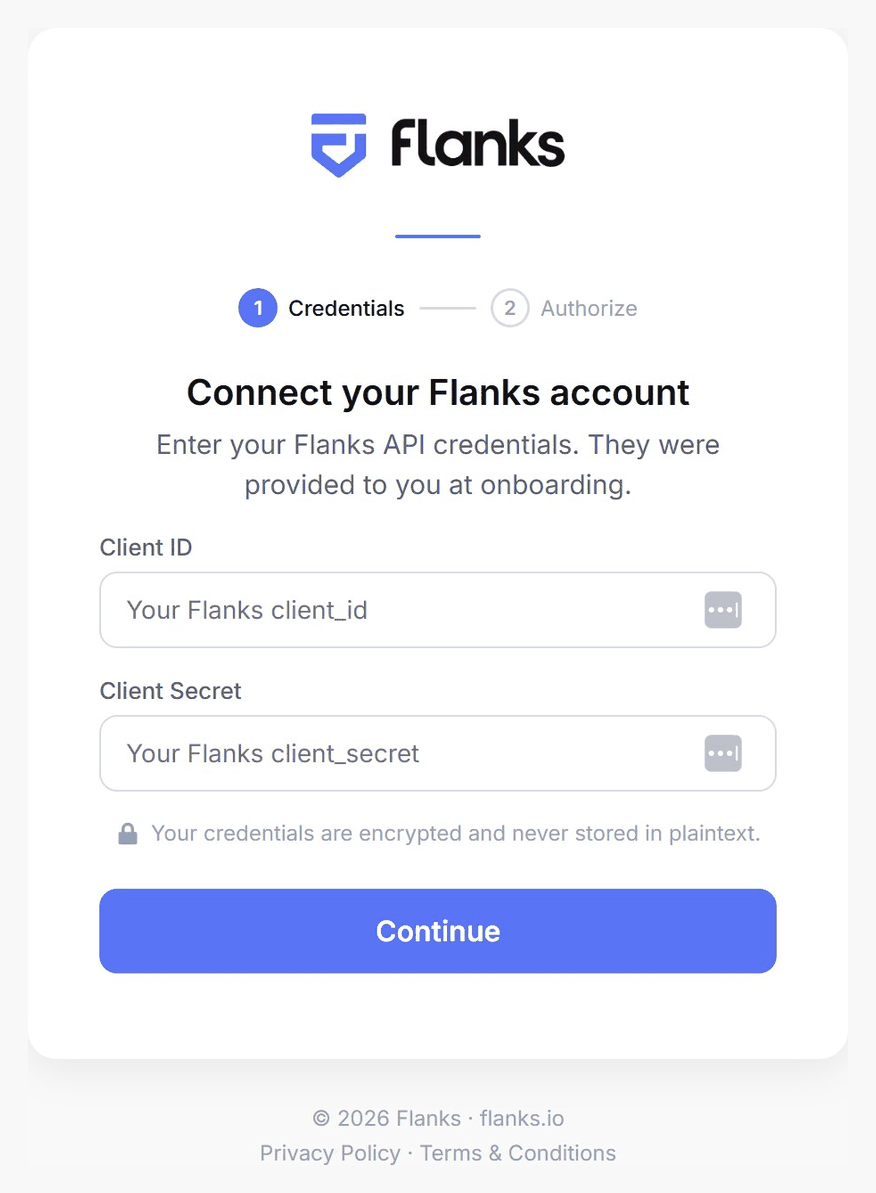
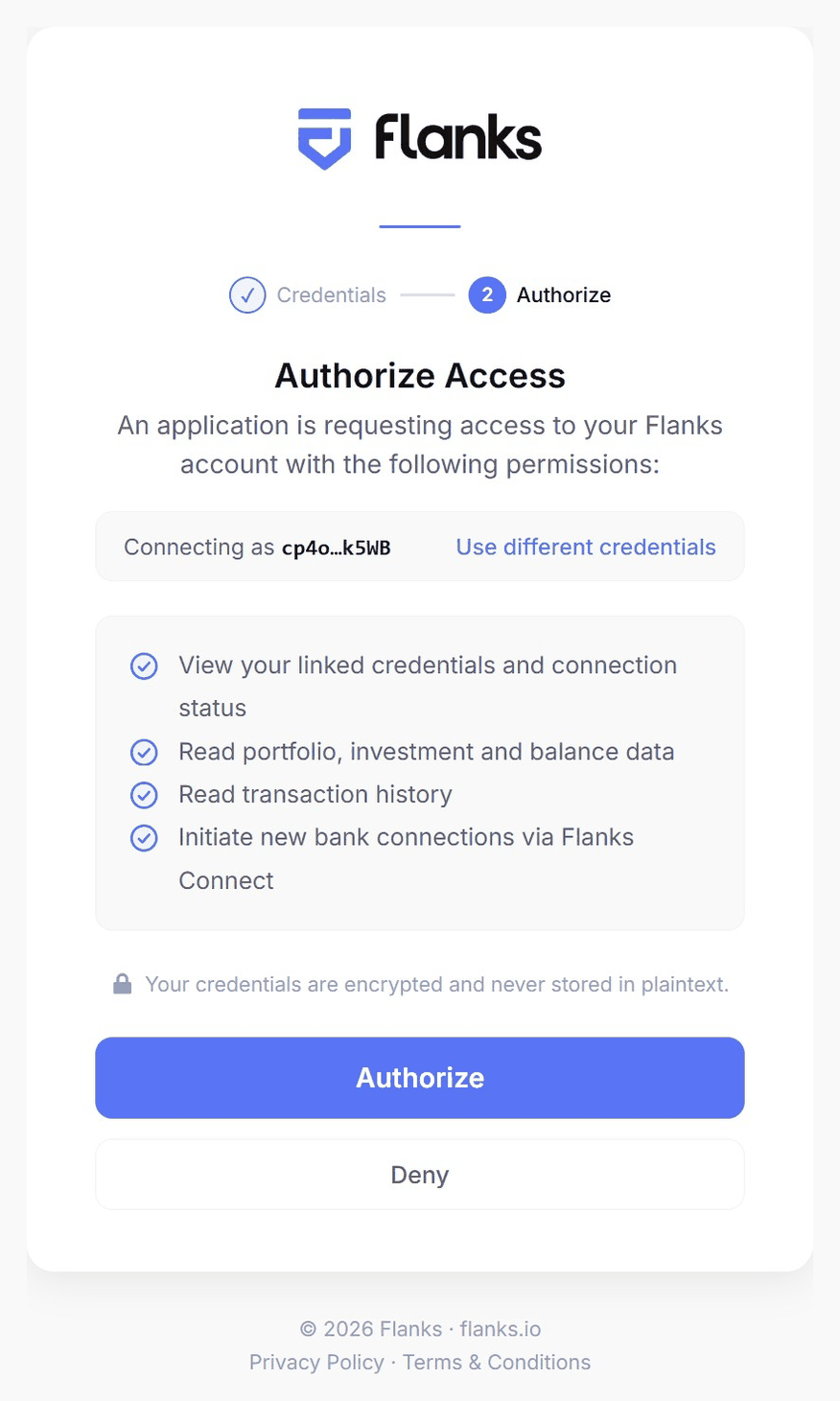
After clicking Authorize, the browser hands control back to the MCP client, which stores the tokens and marks the connector as connected. From then on, tokens are refreshed silently and this page is not shown again until the refresh token expires (30 days) or the connector is reconnected.
Returning users
The browser remembers validated credentials for 30 days, so on later authorizations from the same browser the page goes straight to step 2 and only the Authorize click is needed. Each authorization must be completed within 10 minutes; after that the request expires and has to be restarted from the client.
Obtaining credentials
Credentials (client_id and client_secret) are provided by Flanks. Contact your Flanks account manager to obtain them.
Configure in ChatGPT
ChatGPT supports custom MCP connectors through developer mode, available on Pro, Plus, Business, Enterprise, and Edu plans (web app). In Business, Enterprise, and Edu workspaces, an admin must first allow developer mode in the workspace settings.
Step 1: Enable developer mode
- Open ChatGPT (web) and go to Settings → Apps & Connectors.
- Scroll to Advanced settings and toggle Developer mode on.
Step 2: Create the connector
- Go to Settings → Apps & Connectors and click Create.
- Fill in the connector details:
- Name: for example
Flanks MCP - Description: a short description that ChatGPT uses to decide when to call the connector
- MCP Server URL:
https://flanks-mcp.flanks.io/mcp
- Name: for example
- Select OAuth as the authentication method.
- Click Create. ChatGPT starts the OAuth flow and opens the same Flanks authorization page described in Authorize in the browser: enter the
client_idandclient_secret, then approve the permissions to finish connecting.
Step 3: Use it in a conversation
- In a new chat, click the + button in the message composer and enable Developer mode.
- Select the Flanks MCP connector for the conversation.
- Start asking. For example: "Show me all my portfolio accounts and their balances."
Note
ChatGPT asks for confirmation before executing write or destructive actions. Most Flanks MCP tools are read-only; only flanks-delete-credentials is destructive.
Programmatic access
Backend applications can give an LLM direct access to Flanks MCP tools through the native MCP integrations of the OpenAI and Anthropic APIs. In both cases the model connects to the Flanks MCP server, discovers the available tools, and calls them automatically while answering the prompt, so no MCP client implementation is required on your side.
Authentication works the same way for both providers: obtain a Bearer JWT using the M2M flow (see Machine-to-machine access below) and pass it with the request. The token is forwarded to the Flanks MCP server on each call and is not stored by the provider. Refresh it when it expires (after 1 hour).
OpenAI Responses API
Declare the server as an mcp tool. server_label is required, and the token goes in the authorization field:
from openai import OpenAI

client = OpenAI()

response = client.responses.create(
    model="gpt-5.5",
    tools=[
        {
            "type": "mcp",
            "server_label": "flanks-mcp",
            "server_url": "https://flanks-mcp.flanks.io/mcp",
            "authorization": f"Bearer {access_token}",
            "require_approval": "never",
        }
    ],
    input="What are my current portfolio holdings?",
)
print(response.output_text)
Tip
By default, the Responses API pauses for approval before every MCP tool call. require_approval: "never" skips this for fully automated workflows. If you prefer to keep a confirmation step for the destructive flanks-delete-credentials tool, pass a per-tool approval object instead. See the OpenAI MCP guide for details.
Anthropic Messages API
Anthropic's MCP connector connects to remote MCP servers directly from the Messages API. Pass the token as authorization_token in the server definition, and reference the server with an mcp_toolset entry in tools (requires the mcp-client-2025-11-20 beta header, which the SDK sends via betas):
import anthropic

client = anthropic.Anthropic()

response = client.beta.messages.create(
    model="claude-sonnet-4-6",
    max_tokens=1000,
    messages=[
        {"role": "user", "content": "What are my current portfolio holdings?"}
    ],
    mcp_servers=[
        {
            "type": "url",
            "url": "https://flanks-mcp.flanks.io/mcp",
            "name": "flanks-mcp",
            "authorization_token": access_token,
        }
    ],
    tools=[{"type": "mcp_toolset", "mcp_server_name": "flanks-mcp"}],
    betas=["mcp-client-2025-11-20"],
)
print(response)
Authentication
Flanks MCP uses OAuth 2.0. The /mcp endpoint requires a Bearer token: unauthenticated requests receive a 401, which triggers the MCP client to run the OAuth flow automatically.
The client registers itself with the Flanks authorization server and opens the browser authorization page, where the user supplies the Flanks client_id and client_secret and approves the requested permissions. Because the credentials are collected on the Flanks page, they are never entered into or stored by the MCP client.
After authorization, the server issues a short-lived access token (1 hour) and a refresh token (30 days). When the access token expires, the client silently exchanges the refresh token for a new pair, with no browser interaction required.
Machine-to-machine (M2M) access
Backend services can authenticate without a browser using the client_credentials OAuth 2.0 grant (RFC 6749 §4.4). This is the recommended approach for server-to-server integrations, scheduled jobs, and any workflow where a human cannot complete an interactive OAuth flow.
How it works
Instead of going through the browser authorization page, the backend posts its client_id and client_secret directly to /token and receives a Bearer JWT + refresh token in return. The issued access token is identical in structure and behavior to the one produced by the browser OAuth flow: the same JWT with the same 1-hour expiry. The refresh token is shorter-lived, valid for 24 hours instead of the 30 days of the browser flow, because an M2M client holds its client_secret and can always request a fresh pair directly.
Step 1: Obtain a token
curl -X POST https://flanks-mcp.flanks.io/token \
  -d "grant_type=client_credentials" \
  -d "client_id=YOUR_CLIENT_ID" \
  -d "client_secret=YOUR_CLIENT_SECRET"
Successful response:
{
  "access_token": "<JWT, valid 1h>",
  "token_type": "bearer",
  "expires_in": 3600,
  "refresh_token": "<opaque token, valid 24h>"
}
Step 2: Call the MCP endpoint
Pass the JWT as a Bearer token on every request to /mcp. To verify the token works, run the MCP initialize handshake:
import httpx

def get_m2m_token(client_id: str, client_secret: str) -> dict:
    resp = httpx.post(
        "https://flanks-mcp.flanks.io/token",
        data={
            "grant_type": "client_credentials",
            "client_id": client_id,
            "client_secret": client_secret,
        },
    )
    resp.raise_for_status()
    return resp.json()


def verify_mcp_access(access_token: str) -> httpx.Response:
    """Run the MCP initialize handshake to confirm the token grants access."""
    resp = httpx.post(
        "https://flanks-mcp.flanks.io/mcp",
        headers={
            "Authorization": f"Bearer {access_token}",
            "Content-Type": "application/json",
            "Accept": "application/json, text/event-stream",
        },
        json={
            "jsonrpc": "2.0",
            "id": 1,
            "method": "initialize",
            "params": {
                "protocolVersion": "2025-03-26",
                "capabilities": {},
                "clientInfo": {"name": "my-backend", "version": "1.0"},
            },
        },
    )
    resp.raise_for_status()  # 200 OK confirms the token grants access
    return resp


tokens = get_m2m_token("YOUR_CLIENT_ID", "YOUR_CLIENT_SECRET")
verify_mcp_access(tokens["access_token"])
Calling tools programmatically
The MCP protocol requires a session handshake (initialize + Mcp-Session-Id header) before any tools/call request. Rather than implementing the session protocol by hand, use the OpenAI or Anthropic native MCP integrations described in Programmatic access, which manage the MCP session for you and let the model call Flanks tools directly. To build a raw MCP client, follow the MCP specification.
Step 3: Refresh the token before it expires
The access_token expires after 1 hour. Use the refresh_token to obtain a new pair without re-submitting credentials:
def refresh_access_token(refresh_token: str) -> dict:
    resp = httpx.post(
        "https://flanks-mcp.flanks.io/token",
        data={
            "grant_type": "refresh_token",
            "refresh_token": refresh_token,
        },
    )
    resp.raise_for_status()
    return resp.json()  # returns new access_token + new refresh_token


new_tokens = refresh_access_token(tokens["refresh_token"])
Important
The refresh token is single-use. Each call to /token with grant_type=refresh_token invalidates the old refresh token and returns a new one. Store the latest refresh token after every renewal.
Token discovery
The /.well-known/oauth-authorization-server endpoint lists all supported grant types:
curl https://flanks-mcp.flanks.io/.well-known/oauth-authorization-server
{
  "issuer": "https://flanks-mcp.flanks.io",
  "token_endpoint": "https://flanks-mcp.flanks.io/token",
  "grant_types_supported": ["authorization_code", "refresh_token", "client_credentials"],
  ...
}
Available tools
The following tools are available once connected.
Connect flow tools
Use these tools to link new bank accounts or unblock existing ones via Flanks Connect.
flanks-connectors
Return the catalog of supported banks and providers that can be linked via Flanks Connect. Use this to discover a connector_id before starting the Connect flow.
- Parameters: optional
name(substring filter, case-insensitive),page,page_size - Returns: paginated list of connectors with
connector_id,name, and metadata
flanks-create-connect-session
Create a Flanks Connect session to link a new bank or unblock an existing connection. Provide exactly one of:
connector_id: to start a new connection-
connection_id: to re-login or unblock an existing connection -
Returns:
session_id,widget_url(present this URL to the user to complete bank authentication),expires_at
Warning
The widget_url is single-use and time-limited. Present it to the user immediately.
flanks-session-status
Poll the status of a session created by flanks-create-connect-session. Once the status reaches Finished:OK, the new or updated connection appears in flanks-credentials.
- Parameters:
session_id(required) - Returns:
status,updated_at,widget_url,connection_id,connector_id,expires_at,error_code
Credential management tools
flanks-credentials
List existing bank connections (credentials) in this tenant. Use this to retrieve credentials_token values needed by the data tools.
- Parameters: optional
bank(substring filter),ready_only(exclude blocked/pending),include_status,page,page_size - Returns: paginated list with
credentials_token,bank, and optionally the full status object
flanks-credential-status
Fetch the full status envelope for a specific credential. Use this to understand whether a connection is active, blocked, or requires action.
- Parameters:
credentials_token(required) - Returns: status object with connection health details
flanks-needs-relogin
Evaluate whether a credential requires re-login or unblocking based on its status. Hard conditions (blocked, SCA required, auth error, reset token) trigger a true result; transaction-level errors are ignored.
- Parameters:
credentials_token(required) - Returns:
needs_relogin(boolean),reasons(list)
flanks-delete-credentials
Irreversible
Permanently deletes a credential and all stored data associated with it. Requires confirm=true.
- Parameters:
credentials_token(required),confirm(must betrueto proceed) - Returns: confirmation message
Portfolio & investment data tools
All data tools read from the latest stored snapshot, not live bank data. If credentials_token is omitted, data is aggregated across all credentials in the tenant.
flanks-portfolios
Fetch portfolio accounts from the latest stored snapshot.
- Parameters: optional
credentials_token(one or many),currency,portfolio_type,min_balance,page,page_size,fields,include_source_token - Returns: paginated list with
name,balance,currency,refAccount,type
flanks-investments
Fetch investment holdings from the latest stored snapshot.
- Parameters: optional
credentials_token(one or many),portfolio_id,currency,inv_type,subtype,min_balance,page,page_size,fields,include_source_token - Returns: paginated list with
name,isin,amount,balance,currency,valuation_date,type,subtype
flanks-investment-transactions
Fetch historical investment transactions from the latest stored snapshot.
- Parameters: optional
credentials_token(one or many),investment_id,start_date,end_date,page,page_size,fields,include_source_token - Returns: paginated list with
operationDate,description,amount,balance,currency,unitPrice
Typical flows
Connect a new bank account:
flanks-connectors → flanks-create-connect-session (with connector_id) → poll flanks-session-status until Finished:OK → connection appears in flanks-credentials
Re-login or unblock an existing connection:
flanks-create-connect-session (with connection_id) → poll flanks-session-status
Read portfolio and investment data:
flanks-credentials → flanks-portfolios → flanks-investments → flanks-investment-transactions
Example questions
Once connected, you can ask your AI assistant questions like:
- "What bank connections do I have set up?"
- "Show me all my portfolio accounts and their balances."
- "List my investment holdings in EUR."
- "What transactions happened in my equity portfolio last month?"
- "Do any of my bank connections need re-authentication?"
- "Connect a new bank account."
- "What investment funds do I hold across all my connected banks?"